

Hardware Review: OnLive MicroConsole TV Adapter
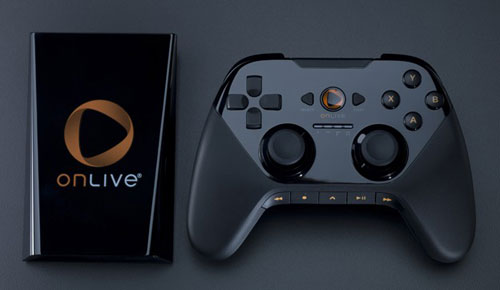
As an overall experience, the OnLive MicroConsole asks quite a bit out of me as a user. Not the service itself, I have no beefs with the service. The OnLive MicroConsole is a box roughly the size of a DSi. It is designed to bring PC gaming to your television or monitor without the need of a computer with reasonable specs, or a computer at all for that matter. There is a lot the OnLive MicroConsole has to offer the world in terms of a cheap and affordable PC gaming experience brought straight to your living room. It’s hard to imagine a world where they could even live up to a fraction of such lofty goals and promises
All it asks is that you have a TV or monitor with an HDMI port, an Ethernet port to plug into nearby, and at least 2 MBPS out of your ISP to experience their service. This is where I ran into some issues. I’ve got power sockets and death squids all over the place, so that’s no problem. My TV is HDMI ready, so no need to drop 30 bucks on a component adapter, and I can handle the MBPS needed. But I’m clearly not the person they had in mind for the MicroConsole. The service allows for computers to connect via WiFi, however the console does not. The console requires you to connect either with an Ethernet cable or through various bridge techniques.
So, as it stands now, my only option is the grab a big ol’ Cat5 that I still have from when I wanted to play some PS2 online and went to work. The problem with this scenario is that I’m too uninterested in crafting any sort of bridge solution, so I’m just stuck having this MicroConsole sitting on the floor with cables strewn about as I try and figure out the best possible way for this to work.
It doesn’t work.
It just sits there.
Neither on my entertainment center or anywhere else useful, it becomes a deathtrap. Ready for my dogs to wander in, trip over, and unplug at any second. But I powered forward. Obviously the best solution for me is to just use my home computer if I really wanted to use OnLive effectively. But hey, this unit was free. I’m going to use it.
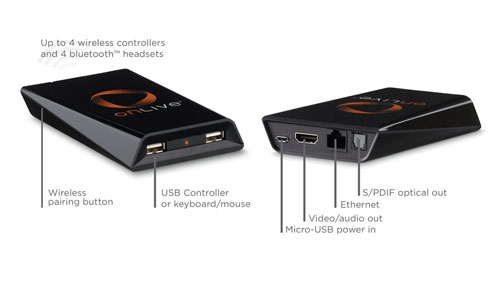
After that, it’s all gravy. The unit boots up in a flash. First time start up is simple enough. Quick sync of the controller using the included USB cable gets your rolling. Speaking of included cables, considering they hand these things out like samples at Costco, it’s pretty impressive that it comes fully loaded with all the cables and accessories you would need. You get your network cable, power cable, USB cable for controller charging, a rechargeable battery, a battery pack that takes double-A batteries, even a pair a Duracell double-A’s to get you started, and surprisingly a rather nicely sized HDMI cable. It really is a fully loaded package.
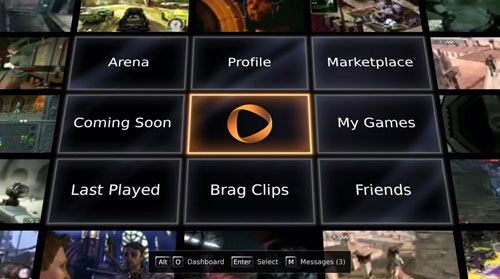
Once you log in using your OnLive account, you discover that the dashboard is exactly the same as the PC experience. The OnLive MicroConsole is not it’s own unique user experience in any way. Outside of using a unique OnLive crafted controller, it is identical no matter how you are using their service.
A unique part of this system is the controller. Most conventional wisdom would just assume that, considering this is ostensibly a PC, that they would either A) pack a simple but branded USB keyboard and mouse with the unit or B) tell you that you can just use most any USB accessories you need. But they don’t.
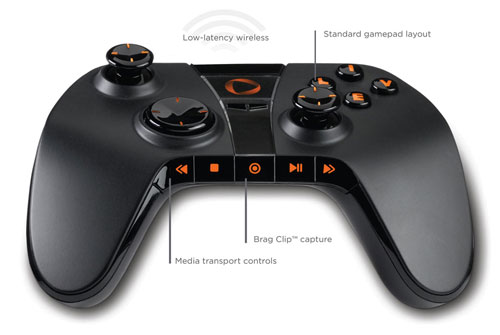
Instead they took a rather surprising route. They included a controller unique to the console. What can only be described as a some sort of insane alchemic formation that is a cross between a 360 controller, a PS3 controller, and a Wii Classic Controller Pro. You get your traditional ABXY buttons, left and right triggers and bumpers, a D-Pad that doesn’t suck (this is important to note), and concave thumbsticks that are laid out like a PS3. There’s also an interesting media row, which allows you to record and control what OnLive has dubbed “Brag Clips”, which is just PR speak for gameplay videos you can record and show off to other OnLive users. It’s a rather nice inclusion.
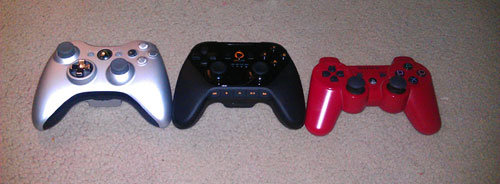
You look at the controller though, and it gives off bad vibes. Aesthetically it looks like a third party controller you’d buy for your PS3 or PC that is both a game controller and a multimedia remote wrapped up into one package. However, its build quality is superb. It has a nice weight to it, and all the buttons, triggers and pads just feel solid. I should note that the OnLive MicroConsole fully supports most USB keyboards, mice, USB hubs and various other third party controllers, including the XBox 360 controller. Check it out below. I lined it up with the 360 and the PS3 controller for quick comparison shot.
I’m not going to spend too much time talking about the service of OnLive, since the service itself is free these days and easy enough to just jump in and try out. Most of the games feature 30 minute timed demos, so if you want to put the system through it’s paces, it’s easy enough to see if it’s for you and if you find it’s stream of Arkham Asylum up to your standards. The biggest worry, and a rightful one at that, is that this service does run through the Internet. You are essentially playing a video of a game with a wireless controller. There is a lot to go wrong in that equation. But I can tell you from first hand experience that it’s a virtually non-existent issue. I’m not so one with the machine that I recognize any sort of lag between pushing the button and having the action happening. It’s a very seamless. There are only a few times when you feel like you’re not actually playing the game directly, and that usually comes from video hiccups or a quick notice of controller lag. I’m not running a particularly fast network at my home, but it’s enough to get things rolling. The image I’m putting out is just barely above standard definition, however I have used the service on much better networks than mine and can say from first hand experience that the image quality can really be superb.
That previous thing I said. About using it on a better network? That’s another great little thing about the console. It’s actually quite portable. The console is itty bitty. Pocket sized even. The controller is a little bulky, and the amount of cables you’ll need is a little much, but if you’re going to be gone for extended periods of time and you REALLY want to get in on that hot Deus Ex action, than this is an adequate solution.
But here is where I always find myself coming back to when thinking about or talking about the MicroConsole. The question here is WHY would you do that? The OnLive home computer client is more than acceptable. In fact, it’s the exact same service. So, taking the console around with you is just silly when you will likely just have your laptop with you. It makes sense using it at home, but it not being wireless can really kill the convenience factor. I’m sure I’m in the minority here, but not very many people I know have their router within earshot of their television.
There isn’t a room with a TV in my house that this will work with unless I implement a bridge, which is just silly for me to bother doing when, again, I can just use any of the computers in my house and hook up my laptop to the TV. A bridge isn’t a difficult thing, it’s actually quite simple, but an inconvenience for someone like me that simply wants to power up and go. It’s not elegant by any stretch of the imagination, and I will suspect that if things really take off, we’ll be seeing a WiFi version of the console or perhaps a peripheral. The controller is great, but I can easily just use a third party controller on my home PC and get the same exact experience. Yeah, it’s not on my big screen TV, but it has to get to the point where you will just wind up saying “Screw it, I’m buying an XBox” and get on with it.
The MicroConsole is not a replacement for a PC. It’s not even a replacement for a home console. I’m really in their demographic for this thing. I’m both a console gamer and a gamer that would like to play some PC titles, but just don’t have the rig for it. The console itself is virtually useless to me, because I’m just not in a position to use it like an average console. In reality, the BEST demographic for this console is someone who wants to game on a budget. The console is a hundred dollars straight up, but there are plenty of deals where just pre-ordering a game will snag you one at no cost.
For that hundred bucks, you get a decent sized catalog that has regular sales (I just picked up Arkham Asylum for a dollar), and even the option to subscribe to a Netflix like service that lets you play a large catalog of games ranging from the original Deus Ex to Braid for just 10 dollars a month. It’s a great console and a great service that has come a long way since it’s subscription based beginnings. If I had the appropriate set up for this console, It’d be another welcome addition to my gaming shelf. But given all the hoops I’ll need to jump through, I really will just be better off using the PC client.
Despite my personal issues, I have the console and the less than ideal or elegant ways of making getting it online without being in close proximity to my networks router (and I’m sure I’m not some outlier on that scatter plot, am I?). The hardware is top notch, well built and well worth owning if you feel like OnLive is the kind of thing you could really sink your teeth deep down into.

Tags: Batman: Arkham Asylum, Braid, Deus Ex, Deus Ex: Human Revolution, Netflix, OnLive, OnLive MicroConsole TV Adapter, PC
This entry was posted on Wednesday, September 7th, 2011 at 10:49 am and is filed under Hardware, Reviews. You can follow any responses to this entry through the RSS 2.0 feed. You can leave a response, or trackback from your own site.









September 7th, 2011 at 11:02 am
Jonah Gregory says:Now I know if I buy stuff with the “get a micro console or a free game” deal to just pick the free game.
The service itself feels pretty solid from what little I’ve used of it.
September 7th, 2011 at 12:02 pm
Arik Jones says:I don’t know why they just didn’t build a dual-band wifi antenna into the MicroConsole. Seems like a no-brainer to me.
I agree Onlive doesn’t replace a decent gaming PC/console. For one the game selection just isn’t quite there yet. Second, when your ISP has an outage (like mine did last night) you’re SOL for any kind of gaming. At least with local hardware you can still play your games (albeit not online). However, I think Onlive is counting on the internet to become a redundant utility (a “right” if you will) like the telephone or electricity. So I think the need for local hardware is growing smaller and smaller with each PC hardware cycle.
September 7th, 2011 at 1:43 pm
Phil says:Just to be clear, you’ve mentioned paying for the service a couple of times. I’ve been an OnLive users since the day it started and it was always free, there was never any subscription that you had to pay for the service. At one point in the beginning they suggested that they might have a fee, but things turned out well for them so that never happened.
September 7th, 2011 at 1:48 pm
Phil says:@Arik Jones They didn’t include WiFi because at the time the console was made OnLive couldn’t run on WiFi, only later after they improved the service could it do that. So it’s quite possible that there will be a WiFi update to the console. I have it myself and yes it’s a big pain for me to stretch an ethernet cable across the room to play it, but I still do when I want to play a game like Arkham Asylum with a controller. I have a PS3 and a Wii but I go were the good deals are and for many games OnLive usually has them.
September 7th, 2011 at 2:02 pm
J.J. Holder says:Yeah, when they launched, it was a pay service but nobody had to pay since they waived it with the AT&T deal, it was just a huge mental roadblock for them at the time of launch, which is really what the point of mentioning their early subscription model was. The thought of paying a monthly fee early on (even if your first year was going to be free and not knowing that it was totally just going to be straight up free in the end) didn’t really jive with people, which they’ve evolved quite a bit from since those early days.
I wouldn’t be surprised to see a firmware update that will allow a USB attachment or some sort of peripheral.
September 8th, 2011 at 12:07 am
HighPriestPepper says:“But given all the hoops I’ll need to jump through, I really will just be better off using the PC client.”
Seemed like there was just one, a direct internet connection. You only had to mention it once in your review, after that it just becomes annoying.
WTF is this paragraph saying:
“The MicroConsole is not a replacement for a PC. It’s not even a replacement for a home console. I’m really in their demographic for this thing. I’m both a console gamer and a gamer that would like to play some PC titles, but just don’t have the rig for it. The console itself is virtually useless to me, because I’m just not in a position to use it like an average console. In reality, the BEST demographic for this console is someone who wants to game on a budget. The console is a hundred dollars straight up, but there are plenty of deals where just pre-ordering a game will snag you one at no cost.”
I am the demo, I am not. I use slang like “straight-up” even though most people won’t pay anything for the console…