

Nintendo DSi: THE UNBOXENING!! & Initial Impressions
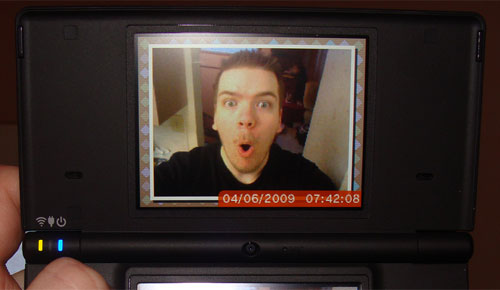
Click to see the gallery!
UPDATE: I found that pictures moved onto an SD card can be found in the “DCIM/100NIN02″ folder. I didn’t see them because I was looking in the “private/ds” folder. They are jpegs and are 640 x 480 at 72 pixels per inch.
The Nintendo DSi actually released while I was at Emerald City ComiCon. I was, however, able to pick mine up on Monday.
This is my fourth DS. I had a fat DS, then upgraded to a Lite. Eventually, the sound gave out and I got another Lite. The second Lite’s L button started to go out on me. I used that as an excuse to purchase this Nintendo DSi. Was it worth it?
Read on!
The DSi has a completely new operating system. From my experience so far, it’s much more solid. Gone are the days when changing a system setting or trying to leave pictochat would force a shutdown of the system. Now, you can simply go back to the menu screen like you should have been able to in the first place. There is also a soft reset executed with a tap of the power button. Firmware updates are now a possibility, meaning the system can evolve and expand new features.
Speaking of features, let’s talk about the DSi camera. First off, it is 0.3 megapixels. What does that mean? It means it takes tiny pictures by today’s standards. What people don’t seem to realize is that instead of complaining about how many megapixels the camera has, they SHOULD complain about how there doesn’t seem to be any way to actually retrieve these pictures for use on your computer (if you find a way, let me know!). You can, however, transfer them to the Wii Photo Channel.
I think the real purpose of this camera is for goofing off. There are a lot of different photo manipulation options for screwing around. None of them are in depth or serious in any way. The distortion lens is the most obvious choice for making abominations as seen below:
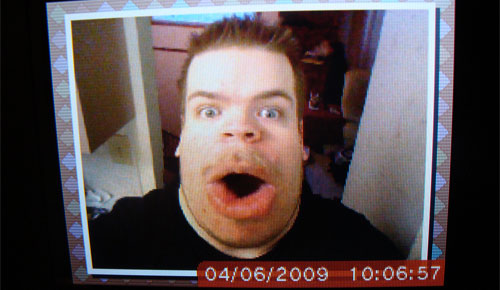
"With great power comes great responsibility"
Next up, we have the sound program. There is a voice recorder. You can use this to screw around with recordings. It allows you to alter the time and pitch independently. This means you can make the recording both slower and higher pitched at the same time. There are also a few effects you can throw on there if you’re feeling especially bored. I would like to have tried out the options for music, but I’m afraid I don’t have anything in AAC format. That’s right! No support for mp3. This is my biggest disappointment with the DSi.
When I visited the DSi Shop, I was awarded with ten buckaroos (aka space bucks) worth of points. I spent five of them buying “WarioWare Snapped!” which I will get into a bit later. Fortunately, the progress bar during downloads is much more readable than on the Wii. Various Mario characters throw blue stuff into a box. The more blue stuff is in the box, the more downloaded it is. Luckily, it is really just a progress bar that fills vertically instead of horizontally. Unlike the Wii, there is more than 3 spots on the progress bar.
While I was shopping, I grabbed the web browser which you can download for free. The browser seems to work fine. My wireless is a bit on the slow side, so the process required a bit of patience. Navigation seemed easy and intuitive enough. There was, however, no support for flash.
There is 256 megs of internal flash memory as well as a slot on the side for SD cards. I’m not sure what use I have for the SD card slot at this point since the photos I copied to it I can’t seem to get on my computer, and I don’t use AAC format for music. I suppose if DSiWare takes off, then I will be using it for that. Perhaps DSi enhanced games will use it for storing large things. I could see a racing game, for example, using the SD card to save replays as a DSi only feature.
It’s time to get physical! All the buttons on the DSi feel tighter than the Lite. Everything is so clicky! I think one of my favorite improvements are the L and R buttons. They are raised more and feel much tighter (less squishy) than the Lite’s. Considering that my last Lite’s L button gave out on me, this makes me feel a little more secure. As most people know, the GBA slot is gone forever. There is promise, though, of downloadable GB and GBA titles. The power adapter is changed. You cannot use a DS Lite charger on a DSi. Why? I have no idea.
The screens are slightly larger and can be set to be even brighter than the DS Lite. The outside is a matte black instead of shiny. Personally, I think this looks much sexier and is less prone to finger prints.
My first gaming attempt with the DSi was “WarioWare Snapped!”. This game works by setting the DSi on a flat surface with the internal camera pointed at your face. Then, after a camera calibration, you use your face and hands as the controller. What I didn’t realize is that after you finish doing all the micro games, it shows you what the camera saw. This completely reveals what a total ass you just made of yourself:
I have yet to try the multiplayer mode, which apparently involves 2 people simultaneously losing their dignity on the same camera. Though the game provides some hilarity for its five dollar price tag, there are a couple problems.
The first is the camera calibration. Everything seemed to work fine the first few times I played it, but later it started telling me my skin was too similar in color to the wall behind me, even when it seemed like it should be fine. The other problem is that there are only 4 quick courses to play. I suppose I can’t expect much for 5 dollars. Still, it’s a nice way to humiliate yourself if you’re running out of ways to do that.
All in all, I don’t regret the purchase of my DSi. Most of the things I like about it, however, are the little things. I’m more impressed by the L and R buttons than I am with the camera, for example. Whether or not it is worth buying is hard to say. I think there is a lot of new potential with the announcement of DSi only and DSi enhanced cartridges using the system’s increased processing power. And if DSiWare takes off with interesting products, things could get interesting. Right now, though, most people probably have little reason to go out and buy one.

Tags: DSi, Nintendo, space bucks, unboxening, unboxing, WarioWare Snapped
This entry was posted on Wednesday, April 8th, 2009 at 5:00 am and is filed under Features, Hardware. You can follow any responses to this entry through the RSS 2.0 feed. You can leave a response, or trackback from your own site.








April 8th, 2009 at 10:21 am
Jonah "spambot" Gregory says:Great write-up.
I think I will wait and see if they do anything amazing with the online abilities of the system before buying my sixth DS system.
April 8th, 2009 at 10:51 am
Jesse "Main Finger" Gregory says:sixth? I didn’t realize you beat me =P
April 8th, 2009 at 11:23 am
Jonah "spambot" Gregory says:I have 2 people I’ve bought DS’s for, and I’m including the fats.
April 8th, 2009 at 11:24 am
Jesse "Main Finger" Gregory says:oh ok, I thought you meant just for yourself, cuz that would be madness
April 9th, 2009 at 4:13 am
Nathan says:For AAC files, don’t you realize that you convert them from MP3′s to AAC in Apple iTunes? Also , does this seems as an alternative to a MP3 player or not?
April 9th, 2009 at 10:50 am
Jesse "Main Finger" Gregory says:I refuse to use Apple iTunes (I hate it). My studio-grade wav editing software doesn’t support AAC, so I will have to download an mp3 to AAC converter. Until then, I can’t really say anything for the DSi’s music playing abilities.
April 9th, 2009 at 7:12 pm
MechaJesus says:Personally, I just find it asinine. Why would you not support the most common file type?
April 12th, 2009 at 3:28 pm
Jesse "Main Finger" Gregory says:aac AND mp3 I could totally see, but just aac? Who has legions of aac files? I know I don’t =P
April 12th, 2009 at 7:26 pm
Jesse "Main Finger" Gregory says:Just posted an update. My SD card has lots of stuff on it so I totally missed the folder it’s in. You can grab photos off it just fine. So it looks like the camera isn’t completely useless afterall. You can now continue making fun of the fact that it’s only 0.3 megapixels.