

Hardware Review: VD-W3 Wii HDMI Upscaler Processor
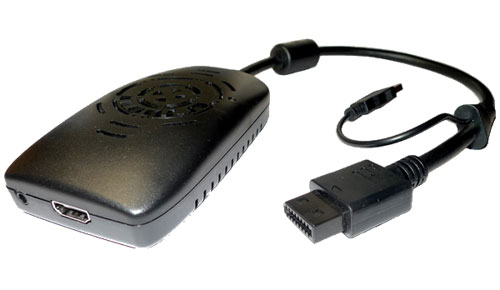
"Is this our Wii HD holy grail solution?"
With the increasing number of HDTVs in homes, many Wii owners have cried out for a “Wii HD”; something that could make their games shine with all the P’s the Xbox 360 and Playstation 3 have been enjoying. In all honesty, I don’t think the Wii HD will ever happen. I feel brave (or stupid) enough to say that right before E3.
Our only non-emulator based HD solution for Wii seems to lie in the VD-W3 Wii HDMI Upscaler Processor. But does it actually work?
First off, let’s get some details out of the way. The device itself costs $59 and can output 480p, 720p, 1080i, and 1080p for TVs and 1280×1024, 1440×900, and 1680×1050 for monitors. The adapter will take up the Wii’s normal AV slot as well as one of the USB slots. From there, the HDMI cable (sold separately) plugs from the upscaler right to the TV. Or if you’re using a monitor, you may need to order their DVI/HDMI converter. If you want to use audio other than HDMI, there is a 3.5mm audio jack on the adapter.
All my testing was done using a Vizio VX32L HDTV10A model TV. Using the dip switches on the bottom of the adapter, I tested every combination of TV resolution (I did not test monitor settings), display mode, and color mode. I tested several games, focusing mainly on Monster Hunter Tri, Super Mario Galaxy 2, and No More Heroes 2: Desperate Struggle.
My first concern was checking to see if the jagged edges I’ve come to expect from Wii games would be lessened. I tested a variety of situations, switching back and forth between component cables and the HDMI adapter.
Unfortunately, under no circumstance did I ever feel the jagged edges looked better. The best I could do was make the edges look “different”, but not better. In fact, certain settings arguably made edges appear worse than with the component cables.
But the biggest improvement I had heard about in the legendary tales of the device was its color enhancing properties. This is where needing to test different games became especially important. The first thing I noticed was that, while there is a dip switch to toggle whether or not color enhancing is enabled, the colors were always more saturated using the adapter.
The Color Mode switch has two settings, “Normal” and “Enhance”. However, a more accurate label would read “Saturated” and “Even More Saturated”. Games such as Super Mario Galaxy 2 are already full of vibrant colors. Using the adapter on either setting looks poor. Colors begin to bleed and detail is lost. It was time to boot up some games with muted tones.
Monster Hunter Tri was the title I had heard it worked especially well with. This is where most of my testing was done. I found that, while the device managed to give the colors more life, things also became much darker. I had to adjust my tv’s brightness a bit to compensate. The problem was most noticeable in dark areas such as caves.
There was a brief period of time where I was convinced the device would be useful for enhancing Monster Hunter Tri‘s colors if nothing else, but while playing No More Heroes 2, I discovered something. My TV’s color saturation settings could produce the same result that the upscaler could.
Immediately, I started testing the idea on Monster Hunter and, sure enough, I was not only able to replicate the vibrant colors without the aid of the adapter, I was actually able to do it with LESS loss in detail and bleeding with my TV’s saturation settings than with the upscaler.
After several hours of testing with numerous adapter and TV settings, I’ve come to the conclusion that the VD-W3 Wii HDMI Upscaler Processor does nothing that my HDTV can’t do better natively. It could still potentially be a good solution for those needing to hook a Wii up to a monitor with HDMI or DVI, but a Wii HD this is not. Perhaps the most valuable lesson I’ve learned from all this is that Monster Hunter Tri looks a lot cooler when I turn up my TV’s color saturation settings.
The VD-W3 Wii HDMI Upscaler Processor can be purchased at VDIGI Electronics for $59.

Tags: hardware, HDTV, Monster Hunter Tri, No More Heroes 2: Desperate Struggle, Super Mario Galaxy 2, VD-W3 Wii HDMI Upscaler Processor, VDIGI, Wii, Wii HD
This entry was posted on Thursday, June 3rd, 2010 at 5:00 am and is filed under Hardware, Reviews. You can follow any responses to this entry through the RSS 2.0 feed. You can leave a response, or trackback from your own site.







June 3rd, 2010 at 11:59 am
Jonah "spambot" Gregory says:Man, that is a shame.
June 6th, 2010 at 9:45 am
sinoguy says:i don’t agree with you, i got this unit run on my 46″ sony panel, look better then my component. of coz, it is still not hd, but with better improvement
June 6th, 2010 at 1:07 pm
Jesse "Main Finger" Gregory says:I think the model of TV you use the device on is going to greatly affect how well it works. That’s why I made sure to share my exact model number.
June 8th, 2010 at 9:55 am
Jonah "spambot" Gregory says:You are welcome to try it out on my TV if you are interested in comparing, Jesse.
June 12th, 2010 at 4:05 pm
jsslifelike says:This is what I had pegged for Nintendo to show at E3. This takes care of the vocal minority while leaving development and hardware SKU’s unaffected. Guess it’s not that great of an idea after all. Sad to hear.
June 12th, 2010 at 10:04 pm
wampdog29 says:Hmmmm HD guess a Wii HD isn;t that great after all, hmm?
But, if it really is that big of a deal to you, you must obviously own an HDTV already (40 inches or bigger is best) and a decent surround sound system. Well, if you own a surround sound system, why not just buy an upconverting receiver that can upconvert analog to digital full 1080p? I did, and trust me, it isn’t THAT much of a difference. Especially Nintendo-made games that are beautiful as they are.
If you don’t own an full HDTV (at least 40 inches or bigger, again) or a surround sound system, then why do you care about Wii in HD?
June 13th, 2010 at 2:52 am
Ad says:I believe the adage is “rubbish in, rubbish out”. Not disparaging the Wii, but it can’t create what isn’t there.
June 14th, 2010 at 1:45 am
Jesse "Main Finger" Gregory says:Just a heads up, I ended up giving the Upscaler to a friend. He’s currently using it with a DVI adapter to hook his Wii up to a computer monitor (for portability reasons) and for that purpose it’s working very well for him.