

Hardware Review: Wii2HDMI Adapter

"Accomplishes it's purpose and works exactly how it sounds."
Although this review is about the Wii2HDMI adapter, I’ve also been using the VD-W3 Wii HDMI Upscaler Processor quite heavily the past few weeks. In this review I will be comparing the two devices.
Size
When I received the Wii2HDMI adapter, I was very surprised how compact it is compared to the VD-W3. After doing a bit of research, I quickly realized the Wii2HDMI is able to afford its compact size by omitting an upscaler.
Measurements:
- 1.3″ x 2.8″ x 0.5″
- 33 x 72 x 13 mm
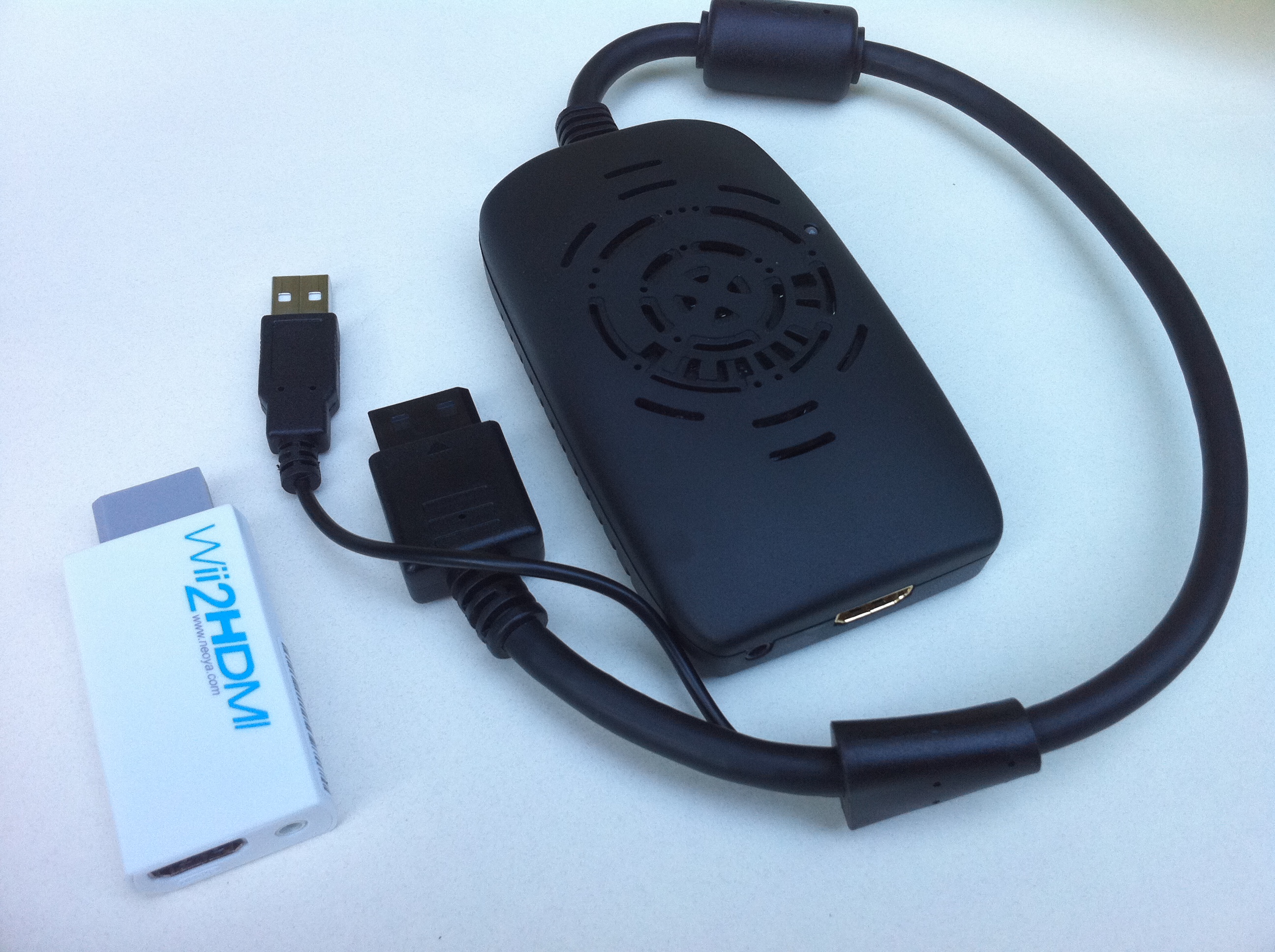
"Wii2HDMI (left) vs VD-W3 Wii HDMI Upscaler Processor (right)"
Function
The primary purpose of this device is to convert from analog to digital so that you can use HDMI or DVI. Because there is no upscaler, there’s no real improvement or difference in image quality over the use of component cables. If you have been using composite cables, which max out at 480i, you will see a huge difference in image quality.
For me, the biggest advantage is the ability to connect to a computer monitor. The monitor I’m using doesn’t have an HDMI input, but does have DVI. I was able to use a $5 HDMI-to-DVI adapter from monoprice for this. Thankfully, there is a mini-audio 3.5mm jack on the Wii2HDMI as well for outputting audio, since DVI doesn’t transmit audio.
Since there’s no upscaling, you’re monitor needs to support 480p (and 480i for some older games) video mode. All TV’s equipped with HDMI inputs are required to support 480p video mode, so that shouldn’t be an issue.
Looking through posts on various forums before ordering, some users were worried this device might cause some lag in video display resulting from the conversion from analog to digital. From experience, I have not noticed any lag whatsoever.
Head to head comparison
Pros:
- Much smaller than VD-W3
- Doesn’t take up a USB port like the VD-W3
- $20 cheaper than the VD-W3
Cons:
- No upscaler
- No color enhancement settings or function
- Image quality no better than Component Cables
Conclusion
All things considered, both products are really great. I’m very happy with both.
If you are looking for a solution to hook up your Wii to a computer monitor, or have a spare HDMI port, and you are happy with the way the colors look without any enhancement, this is a great solution.
If you’re TV or Monitor has a terrible upscaler, or feel the colors are muted, and have no adjustment settings, you may want to consider the VD-W3. In which case, you’ll want to read Jesse’s review of the VD-W3. Your decision will most likely be based on your budget and the model of TV or Monitor you are using.
This review is based on the adapter provided to us by Neoya. The Wii2HDMI can be purchased at Neoya for $39.95.

Tags: HDTV, Neoya, VD-W3 Wii HDMI Upscaler Processor, VDIGI, Wii, Wii2HDMI
This entry was posted on Tuesday, July 20th, 2010 at 12:00 pm and is filed under Hardware, Reviews. You can follow any responses to this entry through the RSS 2.0 feed. You can leave a response, or trackback from your own site.







July 20th, 2010 at 1:57 pm
Wii2HDMI Adapter - review | The Warp Pipe says:[...] Full review here [...]
July 20th, 2010 at 5:10 pm
Juan says:I have noticed a bit of noise in the Wii menu (for example, when you push the Wii Button on the left). I’m using Neoya HDMI cable. Do you have noticed the same problem with the sound? Can the cable be the problem? It looks be a bad digital conversion sound.
July 20th, 2010 at 5:28 pm
Milo "supershamus" Jennings says:I haven’t noticed any unusual noise or loss of audio quality in my use. Could you elaborate on what the noise sounds like?
As for the brand of HDMI cable you’re using, I don’t think that should factor in. Since HDMI is digital, it should either work, or not. All or nothing.
July 21st, 2010 at 4:02 am
Juan says:I have noticed this noise only in the Wii menu. It’s like a “doppler” (“echo” or something similar). The sound have a bit of distortion. This happens sometimes (not always), you advert this when push a button from the menus (I haven´t noticed it in games). It doesn’t happen with components or RGB. Thanks : )
[My lcd is a Sony Bravia KDL 26V4500].
December 24th, 2010 at 8:07 am
Gerardo says:i have the audio problem too, the solution is to use the 3.5mm Stereo Audio Jack with a 3.5mm plug to 2RCA audio cable for audio… no more distortions!